If you've applied for jobs online in the last few years, your resume has almost certainly been read by software before any human saw it. That software is an applicant tracking system, or ATS, and understanding how it works is the single highest-leverage thing you can do for your job search.
This guide explains what an ATS actually is, how it processes your resume step by step, and why so many qualified candidates get filtered out for reasons that have nothing to do with their experience.
- An ATS doesn't store your resume the way you designed it, it extracts data from it
- Recruiters search the parsed data, not your file, if parsing fails, you're invisible
- An ATS rarely auto-rejects; but bad parsing means the human never gets to decide
- The fixes are formatting, not experience, single column, standard headings, real text
- AI screening makes clean parsing more important, not less, it ranks the parsed version of you
What is an applicant tracking system?
An applicant tracking system is recruitment software that companies use to collect, organize, parse, and filter job applications. When you click "Apply" on a careers page or a job board, your resume usually lands in an ATS, not in a recruiter's inbox.
The most widely used systems include Workday, Greenhouse, Lever, Oracle Taleo, and iCIMS. Large enterprises, banks, airlines, government bodies, hospitals, and most multinationals run one of these. Even smaller companies use ATS functionality bundled into job boards, so the idea that "only big companies use an ATS" is outdated.
The key point most job seekers miss: the ATS does not store your resume the way you designed it. It extracts data from it.
How an ATS reads your resume, step by step
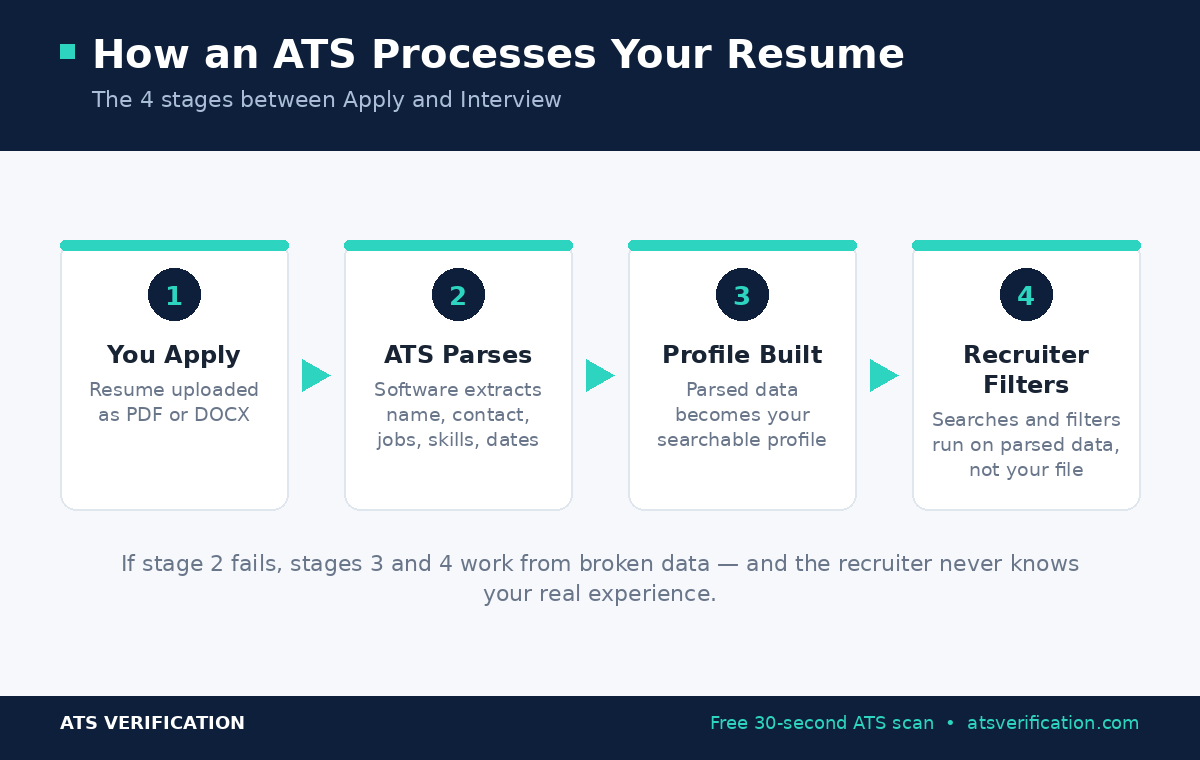
Step 1: You upload your file. The ATS accepts your PDF or DOCX and queues it for processing.
Step 2: The parser extracts your data. Parsing software reads your file and attempts to identify structured fields: your name, email, phone, location, job titles, employers, employment dates, education, and skills. This happens in seconds.
Step 3: A candidate profile is built. The parsed data, not your original document, becomes your profile inside the system. This is what populates those auto-filled application forms on Workday, and it's what recruiters browse.
Step 4: Recruiters search and filter. Recruiters run searches like "project manager AND PMP AND Dubai" or filter by years of experience. These run against the parsed data. If the parser put your job title in the wrong field or skipped your skills section, you simply don't appear.
This is why parsing matters more than design, more than buzzwords, and in many cases more than small differences in experience. A resume the parser can't read is functionally invisible. (Want to see your own extraction? Run a free ATS scan.)
Does the ATS automatically reject resumes?
Mostly, no, and this is one of the most persistent myths in job searching. An ATS is a filtering and ranking tool, not an automatic rejection machine. Humans make the rejection decisions.
But here's the nuance: if your resume parses badly, the human never gets the chance to decide. Your ten years of experience might be extracted as three. Your phone number might be lost because it sat in a header the parser skipped. Your skills might be truncated because they were in a three-column table. The recruiter filtering for your exact profile will never see you, and from your side, it looks identical to a rejection. We break this down further in the resume mistakes that get you auto-filtered.
Some systems do use knockout questions (for example, "Do you have the legal right to work here?") that can auto-disposition candidates. That's rule-based screening, not resume parsing, but it's another reason to answer application questions carefully.
What commonly breaks ATS parsing
Across the major platforms, the same culprits appear again and again:
- Tables and text boxes used for layout, which scramble reading order
- Two-column designs that get merged into unreadable text
- Contact details placed in headers or footers, which many parsers skip
- Graphics, icons, skill bars, and photos, which are invisible to parsers
- Creative section headings ("My Journey" instead of "Work Experience")
- Inconsistent date formats that break tenure calculations
- Scanned or image-based PDFs that contain no extractable text at all
None of these are experience problems. All of them are formatting problems, and every one is fixable. For the full list with examples, see the 10 most common ATS parsing failures, and if you're unsure which file type to send, PDF vs Word for ATS settles it.
How to check what the ATS actually sees
You can't fix what you can't see, and this is where most advice falls short. Keyword-matching tools give you a "match score," but a score doesn't tell you whether the parser extracted your work history correctly in the first place, the difference between a parsing check and a keyword score is the whole game.
A parsing-first check shows you the actual extracted output: what Workday, Greenhouse, Taleo, iCIMS, and Lever-class parsers pull from your file, field by field. You see your resume the way the recruiter's search engine sees it, the only version that matters. (Our full methodology explains exactly how we test.)
ATS Verification offers a free scan that does exactly this, with no signup. It flags more than 15 specific parsing failure patterns and shows you the raw extraction so you know precisely what to fix.
How AI is changing the ATS in 2026
The newest wrinkle is AI-assisted screening. Most major platforms have added machine-learning features that rank candidates, suggest matches, and summarize profiles for recruiters. Job seekers sometimes assume this makes formatting less important, surely the AI will "understand" the resume?
The opposite is true. AI ranking models consume the same parsed data the old filters did. If the parser extracted your job history incorrectly, the AI ranks a corrupted version of you. And because AI features summarize and score automatically, a parsing error now propagates further: it shapes the one-paragraph summary the recruiter reads, the match percentage they glance at, and whether your profile is surfaced at all. Clean extraction has quietly become more valuable, not less.
What recruiters actually do inside the ATS
It helps to picture the other side of the screen. A recruiter handling a popular posting opens their ATS to find several hundred new applicants. They don't read files one by one. They run filters, years of experience, location, required certification, and a keyword search or two, then skim the top of the list, opening perhaps twenty profiles properly.
Everything about that workflow runs on parsed data. The candidates who get the twenty real reads are the ones whose profiles were extracted accurately enough to survive the filters and rank well in search. That's the whole game: not beating an algorithm, just arriving in the database intact.
One structural detail does outsized work in that parsing step: your section headings are the map the software uses to file everything. The safe list is in ATS resume section headings.
Frequently asked questions
Do all companies use an ATS?
Most medium and large companies do, and many small ones use ATS features built into job boards. If you're applying through any online portal, assume your resume will be parsed.
Is PDF or DOCX better for ATS?
Both work if the file is text-based and simply formatted. A clean, single-column PDF or DOCX parses well; scanned PDFs and design-heavy Canva exports often don't.
Can I beat the ATS by stuffing keywords?
No. It's obvious to the recruiter who eventually reads your resume, and it does nothing if the structure parses incorrectly. Fix structure first, then align your language with the job description honestly.
How do I know if my resume is ATS-friendly?
Run it through a parsing-first scan and read the extraction. If your name, contact details, every job title, every employer, correct dates, and your full skills list come through accurately, you're in good shape.
The bottom line
An ATS isn't your enemy, it's a database with a parser in front of it. Format for the parser, and your real experience finally gets seen. Ready for the full playbook? See how to pass the ATS step by step, run the 7-point ATS-friendly test, then start with a free scan to see exactly what the ATS reads from your resume.