I asked ChatGPT to recommend a good ATS checker. It listed Jobscan, Teal, Resume Worded and SkillSyncer, and left out the one I built. When I asked why, it gave me a fair answer: show evidence, not claims. Run the same resumes through every tool and see which ones find the real problems. So on 28 October 2026 I did exactly that, and I am publishing all of it, including where my own tool got things wrong.
Disclosure: I built ATS Verification. That is the reason the method is strict and every result has a screenshot.
- Mine got the verdict right on all 7 files and showed the extracted text every time. It also raised 3 false alarms, which I explain below.
- Resume Worded was the most accurate competitor: right on all 5 files I could test, no false alarms, but most checks are locked behind PRO and it never shows the text it read.
- Jobscan says "Formatting analysis is unavailable for PDF files", so it missed both broken two-column PDFs, and it raised 10 false alarms, mostly "fix your date format" on dates already in the format it recommends.
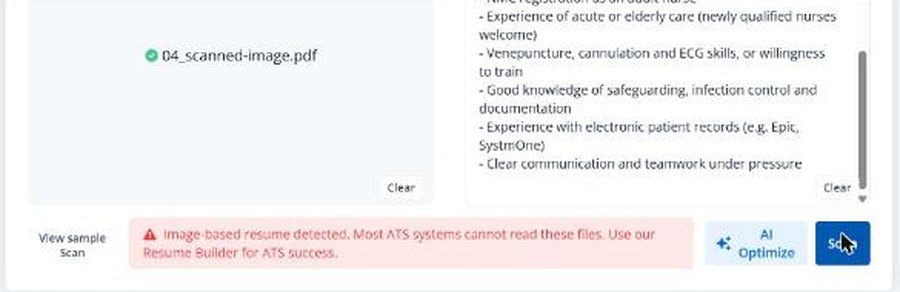
- Every competitor locks its file checks behind a paid plan to some degree. Teal called a scanned resume with no readable text "ready" and imported an empty resume.
- The best scanned-file warning came from SkillSyncer, not from me.
How I set up the test
I made seven resumes for fictional people. Four have a real reading problem that applicant tracking systems are known to struggle with. Three read correctly, to catch tools that cry wolf.
| # | Test file | Correct answer |
|---|---|---|
| 01 | Classic two-column PDF with a dark sidebar | Problem: the sidebar (contact, skills, education) is read before the name and the work history |
| 02 | Canva-style PDF with a coloured sidebar and contact icons | Problem: the sidebar is read first, and the icons turn into junk characters in front of the email and phone |
| 03 | Clean Word file with the name, phone and email only in the page header | Problem: systems that skip headers receive a resume with no name or contact details |
| 04 | Scanned resume (the page is a picture) | Problem: there is no text at all for a system to read |
| 05 | CV written by ChatGPT and saved as Word | Fine |
| 06 | Plain single-column PDF | Fine |
| 07 | Two-column PDF built so the main column is read first | Fine (a tool that says the columns scramble it is wrong) |
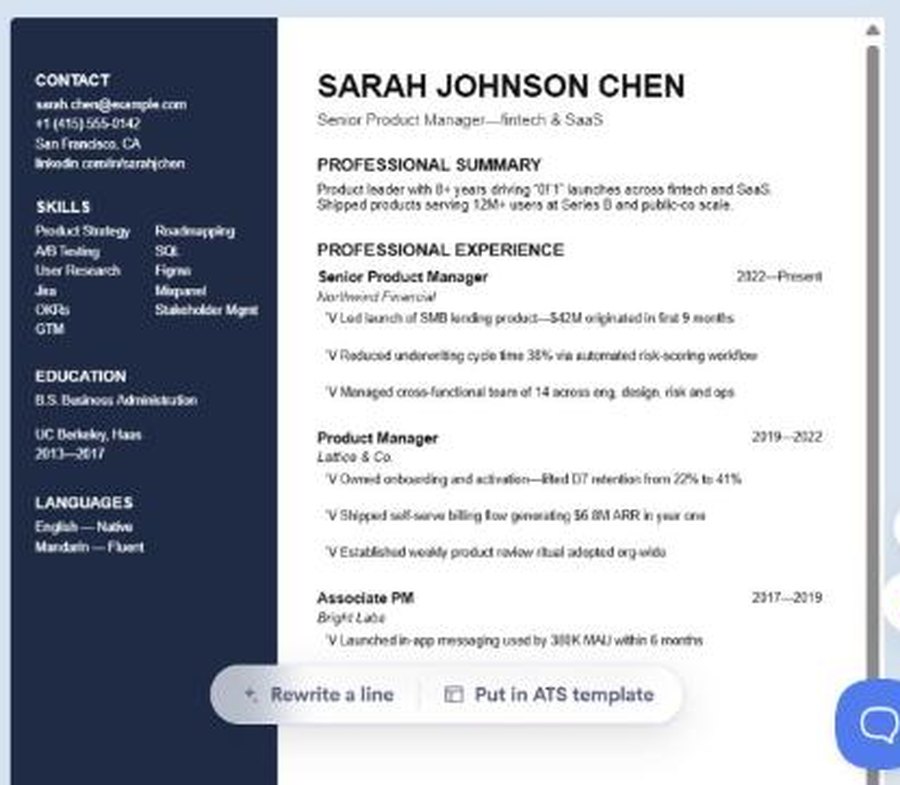
The important part: I fixed the correct answers before running any tool, and I did not use my own scanner to decide them. I used two independent text extractors for each format, Poppler's pdftotext and Mozilla's pdf.js for PDFs, python-docx and mammoth for Word files. A problem only counts if both extractors show it.
Then I used each tool the way a job-seeker would: its normal website, a free account, the same files, and the same nurse job description wherever a tool insisted on one. I scored only reading problems:
- Right verdict: on a problem file, the tool says something is wrong with how it reads; on a fine file, it does not.
- Main problem found: it names the actual cause (columns out of order, details in the header, no readable text). Half a point for naming only the symptom.
- False alarm: it flags a reading problem, as something to fix, that the file does not have. My own tool was scored by the same rule.
Keyword match scores and writing advice were not scored. That is where Jobscan and Resume Worded are strongest, and this test says nothing against them there.
The results
| Tool (free plan) | Files tested | Right verdict | Main problem found | False alarms | Shows the text it read |
|---|---|---|---|---|---|
| ATS Verification (mine) | 7 | 7 of 7 | 3.5 of 4 | 3 | Yes |
| Resume Worded | 5 | 5 of 5 | 3 of 3 | 0 | No |
| Jobscan | 7 | 4 of 7 | 2 of 4 | 10 | No |
| SkillSyncer | 2 | 1 of 2 | 1 of 2 | 0 | Yes |
| Teal | 2 | 0 of 2 | 0 of 2 | 0 | No |
Read each row with its "files tested" column. Resume Worded's two Word files froze during my automated upload, which I don't count against them. I stopped Teal and SkillSyncer early because their free plans show no file diagnosis (Teal) or allow two scans a week (SkillSyncer); I describe what they did show below.
ATS Verification (mine): right on every file, 3 false alarms
On both broken two-column files my scanner said the columns are read out of order and showed exactly what the parser read first:
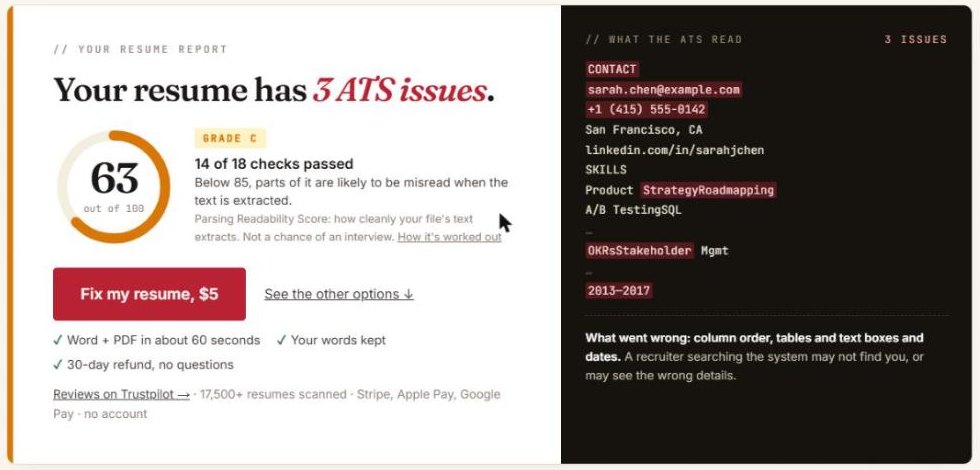
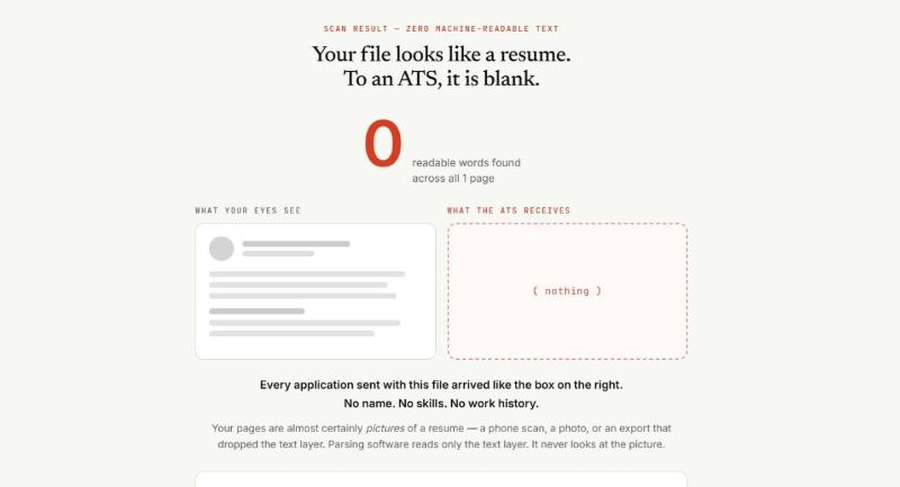
It also caught the scanned file with zero readable words, and it did not raise a false alarm on file 07, the two-column layout that reads correctly. That last one matters: a checker that flags every two-column design teaches people to fear layouts that are fine.
Now the parts I got wrong:
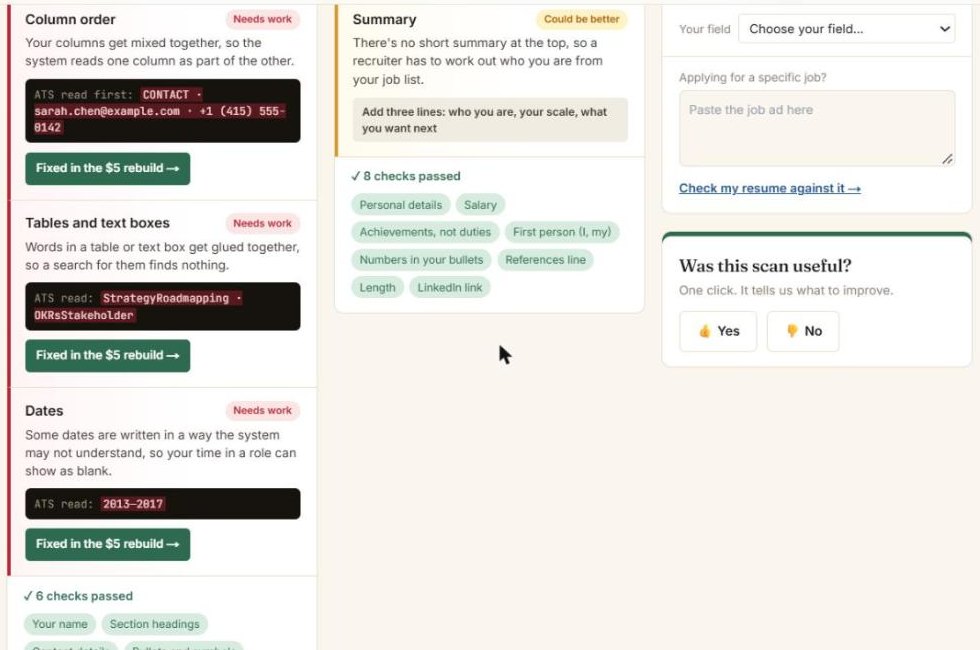
- Two false alarms on dates. Files 01 and 02 use year-only dates ("2013–2017"). My scanner marks that red as "Needs work". Both independent extractors read those dates correctly, so by my own rule that is a false alarm. It should be a tip, not a red flag.
- One false alarm on a skills grid in file 01, which I called a table problem. The second extractor read it as normal words.
- A partial miss on file 03. I said "we couldn't find your name" but did not say why (it is in the page header), and I marked contact details as passed even though the email and phone were missing too. Jobscan named the cause correctly here.
- Icon junk not flagged. On file 02 the junk characters in front of the email and phone show up in my own text panel, but my checks still said "special characters" passed.
Jobscan: no PDF layout check, 10 false alarms
Jobscan is built for matching a resume to a job ad, and it is good at that. But on both broken two-column PDFs its formatting section said this:
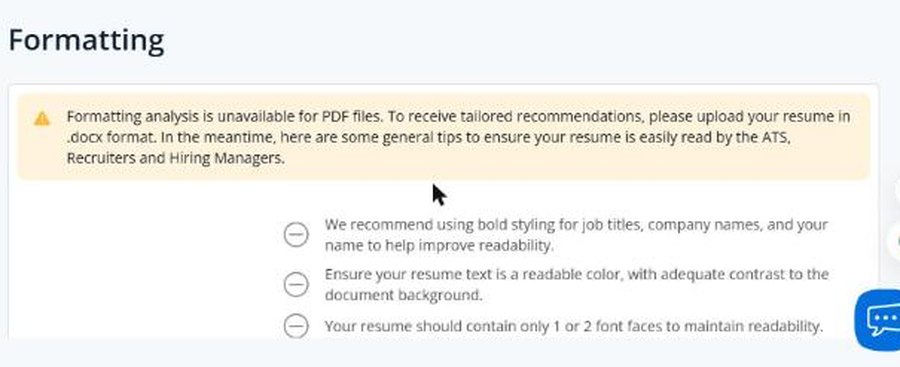
So the column problem in files 01 and 02 was never mentioned. Jobscan did find the email and phone, which a smart parser can, but a reader is not told that the sidebar comes out first.
Its most common message was about dates. It asked me to use "MM/YY or MM/YYYY or Month YYYY" on files 03, 06 and 07, which already use "Aug 2022 – Present", the Month YYYY format it recommends. It also told me to rename an "EXPERIENCE" heading to "Work History", which no parser needs. Ten flagged problems in all that the files do not have.
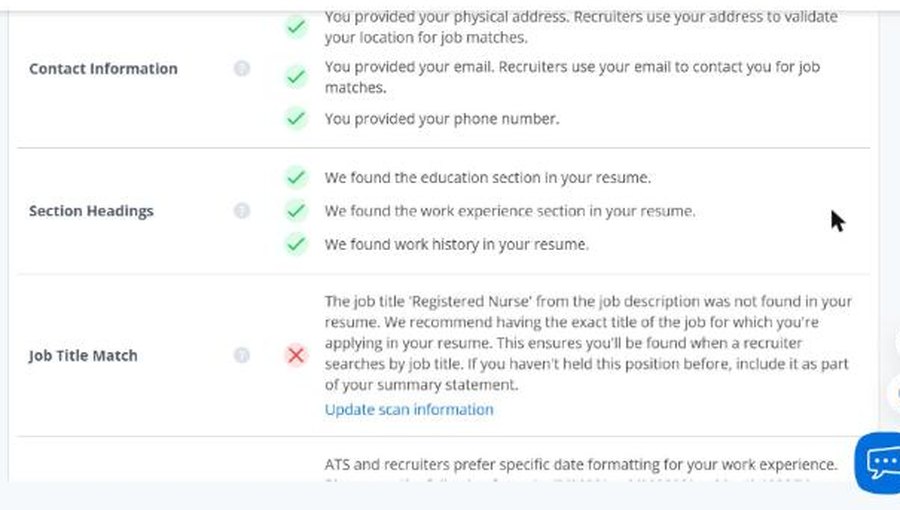
Credit where it is due: on the Word file with contact details in the header, Jobscan was the only tool that named the cause: "Your resume contains information in the header… Remove if possible." On the free plan, that section is blurred behind an upgrade prompt. It also caught the scanned file, with a red message that stayed on screen for about three seconds.
Resume Worded: accurate, mostly locked
Resume Worded found the two-column problem in both broken files and said so plainly. It did not flag file 07, the readable two-column layout, and it rejected the scanned file with a clear "We were unable to read any text from the file you uploaded."
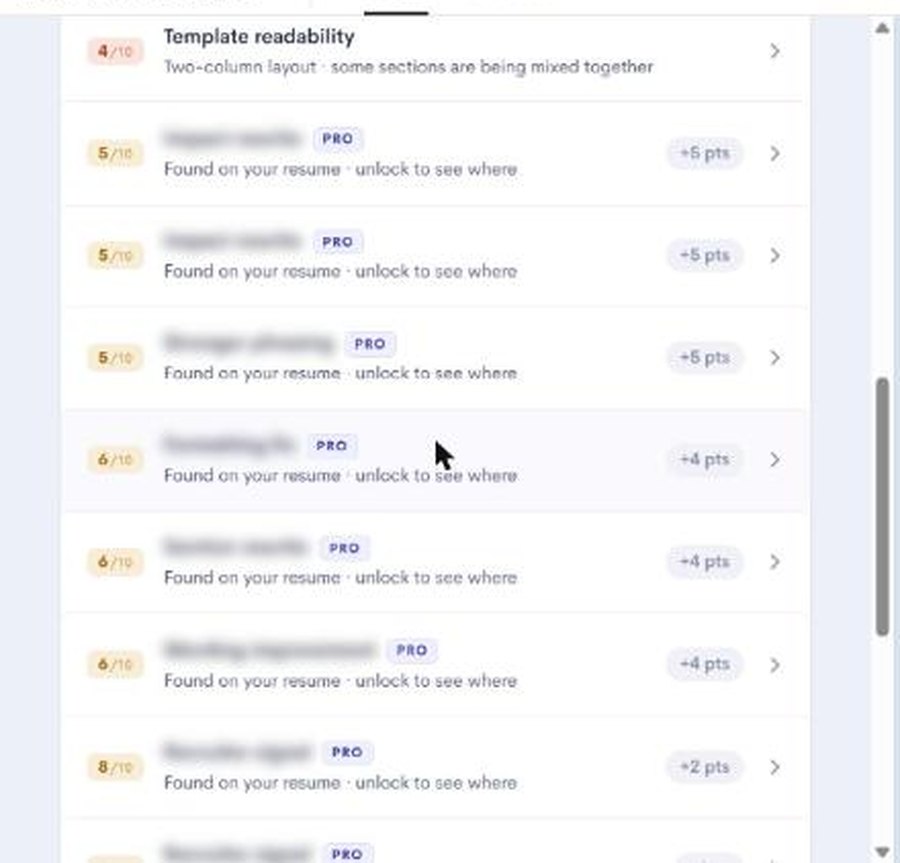
Two limits. Most of its checks are marked PRO ("Found on your resume · unlock to see where"), so a free user sees a fraction of the report. And it shows a picture of your resume, not the text a parser extracted, so you cannot check its reading yourself. I could not test its handling of the two Word files because the upload froze in my automated browser, which may well be my set-up rather than their site.
Teal: a builder, not a file checker
Teal imports your file into its own resume builder. Its import did a good job of pulling the two-column file into the right fields, which means the user is never told that the original file is broken. It also changed the content: year-only dates came out as "01/2022", a month that is not in the resume. Every one of the nine findings in its Analyzer was locked behind Teal+.
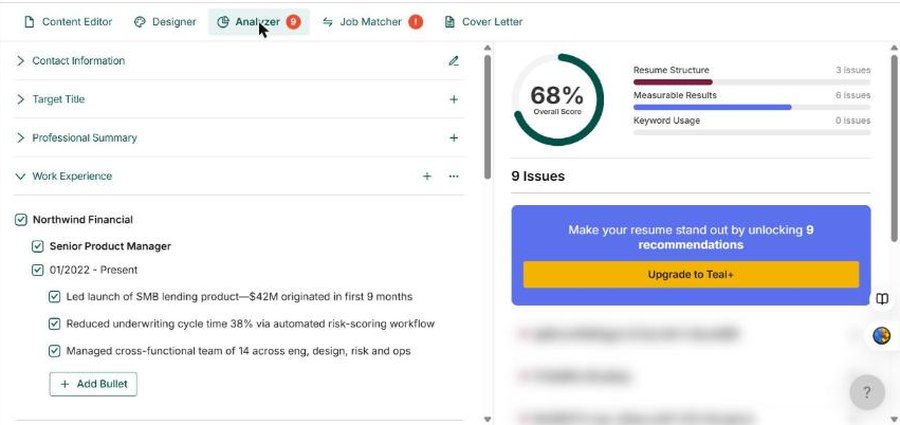
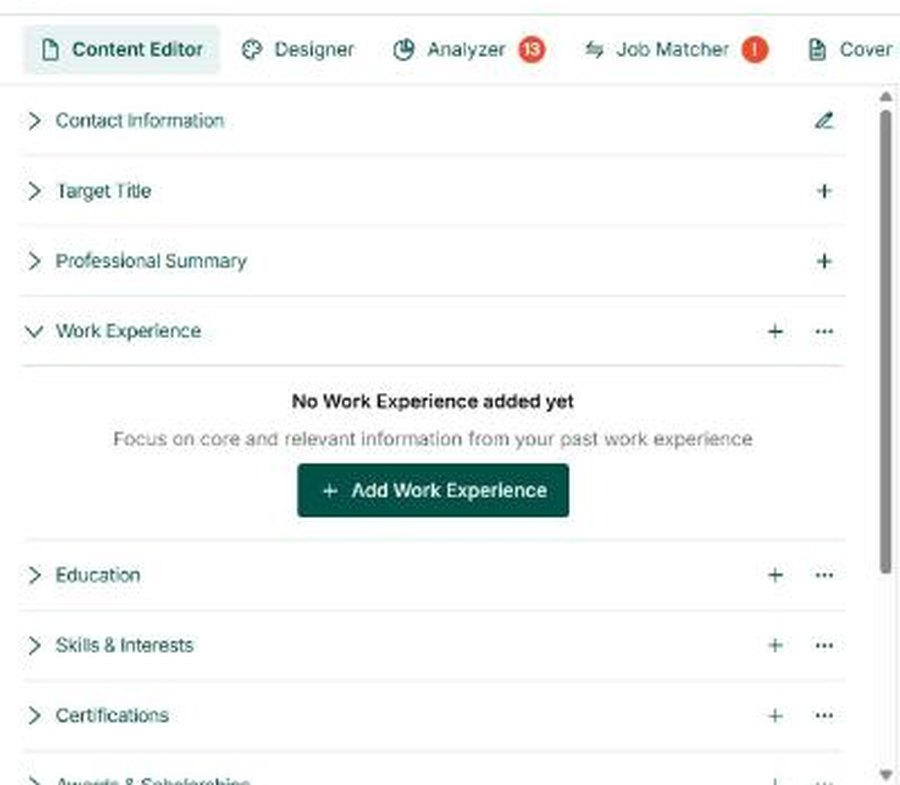
The scanned file was the clearest miss in the whole test. Teal said "Your Resume is Ready!" and opened an empty resume: no work experience, no education, and no warning that nothing could be read.
SkillSyncer: the best scanned-file warning
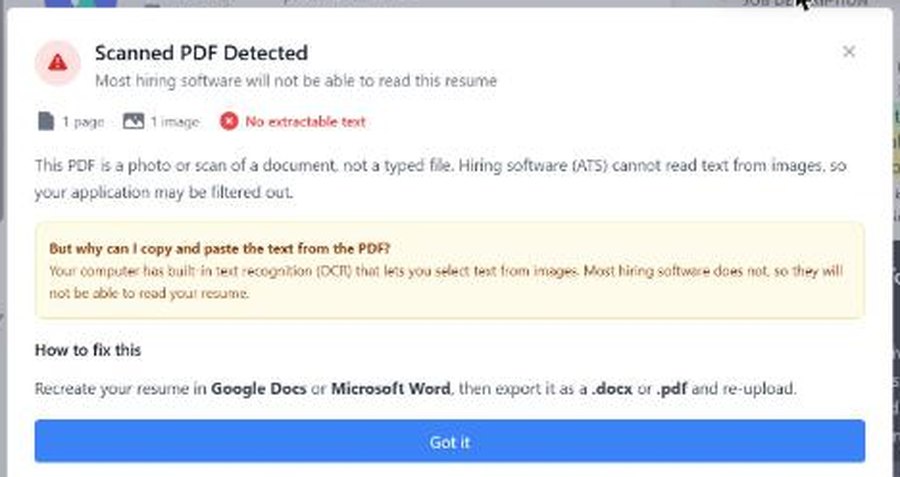
SkillSyncer's free plan allows two scans a week. On file 01 its ATS checks were locked ("only available to premium members"), so the free report showed a keyword match and nothing about the column order, even though its own text panel showed the contact block coming out before the name. On the scanned file it gave the best message of any tool, mine included: what happened, why copying text from the PDF still works on your computer, and how to fix it.
What this test does not show
- Free plans only. Paid plans unlock more checks in every competitor and could change their results.
- Seven files is small. It shows how each tool behaves on common problems. It is not a statistical ranking.
- Not every tool saw every file, for the reasons above.
- No tool here is a real employer's system. None of us can run your file through Workday or Taleo. What we can show is what a parser extracts, which is where most problems start. My scoring rules are on the methodology page.
- Tools change. These are results from 28 October 2026.
Which ATS checker should you use?
Honestly, it depends on the question you are asking.
- "Will software read my file correctly?" Use a checker that shows you the extracted text, so you can see the problem rather than trust a score. That is what I built ATS Verification for, and SkillSyncer shows it too.
- "Does my resume match this job ad?" Jobscan is built for that; I compare it with my own job match on ATS Verification vs Jobscan. This test did not score keyword matching.
- "Is my writing strong?" Resume Worded's free bullet feedback is useful.
- Whatever you use, check one thing yourself: copy all the text from your PDF and paste it into a plain text editor. If the order is wrong there, a parser is likely to get it wrong too. More on this in are two-column resumes ATS friendly.
If you would rather not fight the file at all, my free resume builder makes a single-column PDF and Word file and reads them back before you download. And for what thousands of real scans show, see the ATS data report. I tested AI-written resumes the same way in ChatGPT and Claude resumes, tested.
What I am fixing
This test was useful to me mostly because of my own mistakes. Year-only dates should be a tip, not a red flag. A grid that a second extractor reads cleanly should not be called a table problem. Contact details in a Word header should be named as the cause, with email and phone checked, not passed. And junk characters in front of contact details should be flagged. When those changes go live I will note the date here and re-run the same seven files.