I have written my own CV more times than I can count: as an audit associate at KPMG, moving into industry in the UAE, and again this autumn, when one of the first sessions on the Executive MBA at London Business School was about rebuilding our CVs from scratch. I have also hired for my own finance team, and I built a scanner that reads the raw text software pulls out of a CV. Over five days this October it read 1,540 of them. This guide is what all of that taught me, in the order I would do it.
- Decide the job first. A CV is an argument for one role, not a record of everything you have done.
- Layout before words. One column, standard headings, real text. If the software cannot read it, nobody reads your sentences.
- Every bullet is a verb, what you did and the result. A number is what a recruiter remembers.
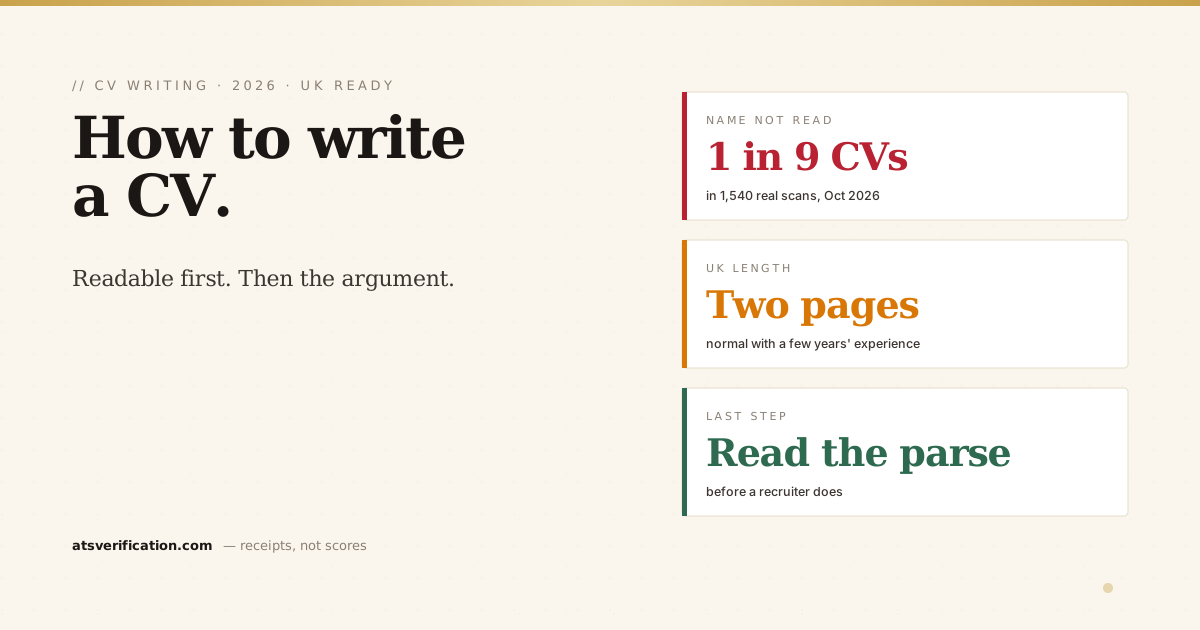
- Two pages is normal in the UK. No photo, date of birth or marital status.
- Read your own parsed text before you send it. In our scans, about one CV in nine came out without the candidate's name recognised at the top.
Step 1: Decide which job this CV is for
The most common mistake I see is a CV written for every job at once. It lists everything, emphasises nothing and leaves the recruiter to work out where you fit. They will not.
Pick one target role. Then find three or four real adverts for it and read them properly. Note the job titles they use, the skills that appear in every one, and the scale they mention: team size, budget, number of clients. Those adverts are your brief. When I rewrite my CV for a finance director role, the adverts tell me to lead with P&L ownership and board reporting. For a transformation role, the same career gets told through system implementations and process change. Nothing is invented; the order and emphasis change.
Step 2: Set up a layout software can read
Most larger UK employers receive applications through an applicant tracking system. It extracts the text from your file and sorts it into fields: name, contact details, employers, job titles, dates, education. Recruiters then search and filter those fields. If the extraction goes wrong, the recruiter's view of you is wrong before anyone has read a word.
The rules are dull and they work:
- One column. Two-column designs often come out in the wrong reading order, with your job titles separated from their dates.
- Standard headings: Profile, Experience, Education, Skills. In our recent scans, about 12% of CVs had headings the checker could not match to a standard section. "My journey" is charming; it is not a section a parser recognises.
- Contact details in the body of the page, not in the Word header or footer, which some systems skip.
- No tables, text boxes or graphics for content. Text inside them can be flattened into one line or lost.
- Plain bullets. About 14% of the CVs we scanned used icons or symbols as bullets, which can turn into stray characters.
- A real text file. A Word document, or a PDF exported from Word or Google Docs. Never a scan or a photo of a page.
Design templates are where most of this goes wrong. About one in nine of the CVs we scanned was made in Canva. Some of those read perfectly; the ones built from sidebars, columns and icons are the ones that scramble. If you want to see the difference, our free single-column templates are built to these rules.
Step 3: Write your contact details
Your name on its own line at the top, in plain text. Underneath: phone, email, town or city (a full street address is not needed), and your LinkedIn URL. In our scans, about 11% of CVs came out without the name recognised at the top, usually because it was inside a header, a text box or a decorative block.
If you are applying in the UK, add your right to work in one line, for example "Right to work: UK citizen" or "Skilled Worker visa holder". Employers have to check it (GOV.UK explains the process), and saying it up front saves a recruiter wondering.
Leave off your photo, date of birth, marital status, religion and national ID numbers. UK employers do not expect them, and the Equality Act 2010 is a large part of why many would rather not receive them. About 4% of the CVs we scanned still listed a date of birth. If you apply in a region where these details are expected, keep a separate version for those applications.
Step 4: Write a personal statement that says something
The personal statement is three or four lines at the top. It is a UK habit, and a useful one, because it is the only part of your CV a recruiter is guaranteed to read. In our scans, about 73% of CVs had one.
A good one does three things:
- Says what you are, in the advert's words: "Chartered accountant", "Retail store manager", "Software engineer".
- Gives the scale you work at: team size, budget, revenue, number of sites or clients. This is the part almost everyone skips, and it is what separates two candidates with the same job title.
- Offers one proof: a result with a number.
Mine, for finance roles, opens with the size of the P&L I own and the number of countries I cover. It does not say "hardworking" or "passionate", because every candidate says that, so it tells the reader nothing. There are more worked examples in these personal statement and summary examples.
Step 5: List your experience, newest first
For each role: job title, employer, town, and dates (month and year). If the employer is not a household name, add one line saying what it does and how big it is. A recruiter cannot judge "Finance Manager" without knowing whether the business turns over two million or two billion.
Then three to six bullets per role, more for recent and relevant jobs, fewer for old ones. Each bullet should be:
- A verb first: led, built, cut, launched, negotiated. Not "responsible for".
- What you actually did, specifically.
- The result, with a number where you have one: money, time, percentage, volume.
"Responsible for month-end reporting" becomes "Cut month-end close from eight days to five by automating the bank reconciliations". Same job, different candidate. The careers team at London Business School pushes a version of this they call context, action, result, and they are strict about one more rule I now follow: no "I" and no "my". The bullet starts with the verb.
Be careful with numbers. Use real ones you could defend in an interview. If you do not have an exact figure, a rounded honest one ("about 30 suppliers") is better than an impressive invented one.
Step 6: Education and qualifications
Degree, university and year, with your classification if it helps (a 2:1 or First is worth stating). Professional qualifications go here too, and in finance they often matter more than the degree: I list my ACCA membership near the top for exactly that reason. A-levels or equivalent are worth including early in your career and can be dropped once you have a few years of experience.
Use the full names of qualifications at least once, because a recruiter may search for either the abbreviation or the full name: "ACCA (Association of Chartered Certified Accountants)".
Step 7: Keep the skills section short and plain
A plain list of the tools and skills the advert asks for that you genuinely have: software, systems, languages, methods. No star ratings, progress bars or percentage circles. They mean nothing to a recruiter ("Excel 80%" of what?) and they are graphics, not text, so the software cannot read them anyway.
Avoid putting the skills in a table to save space. Tables are one of the layouts most likely to come out of the extraction as one long string of glued words.
Step 8: Get the length right
In the UK, two pages is normal for anyone with a few years of experience. One page suits a student or recent graduate. Of the PDF CVs we scanned recently, about 52% were one page, 38% were two pages and 10% ran to three or more. If you are on page three, the oldest roles can usually shrink to a single line each: title, employer, dates.
The National Careers Service has a good plain guide to what goes in each section if you want a second opinion on the basics. For the full list of British conventions (spelling, references, gaps), see our UK CV format guide.
Step 9: Read what the software reads
This is the step almost nobody does, and it is the reason I built the scanner. The CV you see in Word is not what an applicant tracking system receives. It receives extracted text, and that text can have your name missing, your dates detached from your jobs, or your skills glued into one word.
Before you send it anywhere, run the finished file through an ATS CV checker. Ours is free and needs no signup: you see the extracted text next to every problem it finds, with a one-line fix for each. It cannot tell you how a particular employer has configured its system, but it will show you the problems that would trip up most of them.
CV or resume: does it matter?
For the writing, no. In the UK and most of the world "CV" is simply the word for what Americans call a resume. The differences are conventions: UK CVs open with a personal statement and run to two pages, and in the US a "CV" usually means a long academic document. The software reads both the same way. The country-by-country detail is in CV vs resume rules by country, and if you are writing the American version, how to write a resume covers it.
The cover letter
Many UK applications still ask for one. Keep it under a page, open with the role and your strongest relevant result, and answer two or three requirements from the advert with real examples. There is a step-by-step version in how to write a cover letter, and you can paste yours into the free cover letter checker before you send it.